


Software Update: App Updates
4.48.00 Reviews
App Specs
- Version
- 1.8.0
- Updated On
- License
- Free
- Downloads
- 100,000+
- Developer
- Dream App Studios
- Categories
- Libraries & Demo
- Platform
- Android
Screenshots
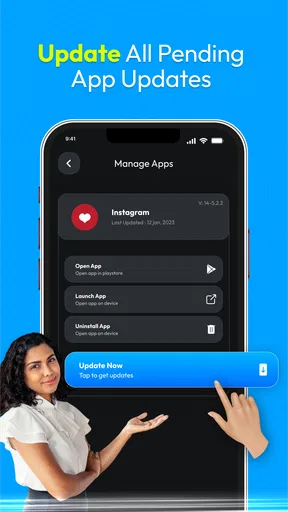
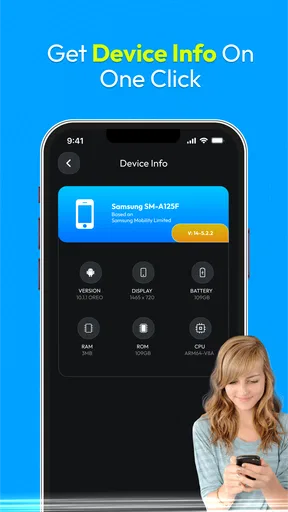
 Analysis by AppCompare
I tend to notice app updates when I’m already trying to do something else: a button has moved, a familiar screen looks different, or a download is waiting at an inconvenient moment. That is the everyday problem Software Update: App Updates is meant to address. It’s a free Android utility from Dream App Studios, in the Libraries & Demo area, built around checking for software updates and making app maintenance easier to keep track of. I’d think of it as a helper for people who want a clearer routine, rather than a replacement for the phone’s own update system.
What to expect from its speed
The useful question is not whether an update helper can make downloads magically faster; it cannot change the time an app’s update takes to arrive or install. Its value is in helping you notice available updates and decide when to deal with them. That distinction matters if you’re expecting a single tap to make an older phone feel new again. Updates can bring fixes and changes, but they can also take time, and the app is best viewed as a way to organize the task rather than speed up the underlying process.
In my view, the most sensible routine is to check when you have a stable connection and a few minutes to spare, then let downloads and installations finish before relying on the phone for something important. If you’re heading out, waiting for a ride, or about to join a call, that is a poor moment to start a batch of updates. A brief check during a quiet part of the day is less disruptive and gives you room to respond if an app needs attention afterward.
Busy moments and a practical routine
Imagine you’re preparing to use a travel, banking, or messaging app and notice it has an update waiting. Rather than interrupting your plans with several unrelated downloads, you can use an update-focused utility to review what needs attention and choose a calmer time. I’d still handle a particularly important app individually if I needed it right away: updating everything together may be convenient, but it can also leave you waiting while several tasks complete.
A useful habit is to avoid treating every available update as equally urgent. If an app is working normally and you’re about to use it, you may prefer to update later; if you’re troubleshooting a problem, an update may be worth checking sooner. This kind of judgment is more valuable than simply chasing the newest version. Keeping some breathing room also makes it easier to notice which change preceded a problem, instead of changing many apps immediately before an important task.
Where it fits among update options
On Android, the built-in app store is the natural place to obtain and install app updates. A dedicated update helper is more useful when you want a separate place to think about the task, especially if you often forget to check. It should complement the regular store workflow, not persuade you to install software from unfamiliar sources or to ignore the phone’s own update controls. For someone who already checks the store routinely and is happy with that process, adding another utility may not make daily life better.
It is also worth separating app updates from operating-system updates. Updating individual apps does not itself upgrade Android, and an app-maintenance tool should not be mistaken for a way to extend a phone’s support life. I’d use the phone’s system settings for Android version and security updates, and use an app-focused workflow for the software installed on top of the system. Keeping those jobs distinct helps avoid confusing a current app with a fully current device.
Worth Reading Before You Choose

EA SPORTS FC Mobile 26 Is a Bigger Football Game, but It Takes Time

Flipboard Shows What News Apps Must Do Beyond the Feed

Switching to Android Auto Means Rethinking Your Driving Routine

Google Calendar Makes a Crowded Week Easier to Manage

Ludo King Makes the Most of the Minutes Between Plans

Baby Panda World Brings Quick Play to Modern Phones, but Its Game Library Feels Busy
Reliability, control, and sensible expectations
For reliability, I care most about being able to understand what is being updated and keeping control of timing. An update can alter the way an app behaves, so I prefer not to start one immediately before using that app for work, travel, or a time-sensitive payment. If something looks different afterward, checking the app’s own settings and support information is a reasonable first step. I would not assume that an update helper can reverse every change or restore an older release; for important data, I rely on the app’s own backup and recovery options where available.
There is a trade-off between convenience and oversight. A more automatic routine can reduce the chance that you forget, but it also means you may pay less attention to what changed. If you use an app for a critical purpose, it is worth opening it after an update and confirming that the key task still works. That small check is often more useful than assuming a successful download guarantees that every feature behaves exactly as before.
Device demands and who should choose it
I’d expect an update-checking utility to be most appealing on a phone where the owner has accumulated many apps and does not want to inspect each one separately. It can also suit someone helping a less confident family member keep a device organized, provided that person remains involved in approving changes. If you only use a handful of apps, or already have a dependable update habit, the extra step may feel unnecessary.
Device age is another practical consideration. This app’s minimum Android requirement is version 5.0, which makes its stated compatibility broad, but that does not mean every older phone will install or process updates quickly. Available storage, connection quality, and the size of an individual update all affect the experience. If a phone is short on space, I’d first remove downloads or apps I no longer use rather than repeatedly retrying updates without checking what is taking up storage.
Who may want a different approach
This is not the right choice for someone who expects a maintenance app to repair a slow phone, guarantee compatibility, or manage every part of Android. It is also not a substitute for reviewing app permissions or deciding whether an app still deserves a place on your device. If your main concern is privacy or reducing background activity, a manual check through the standard app store may be simpler: you can update only what you need and avoid installing a separate utility.
For people who share a phone, or manage more than one device, the benefit depends on how much control each user needs. A shared device still calls for agreement about when updates happen, since an update can affect another person’s routine. And if you maintain several phones, a centralized update helper should not be assumed to synchronize them; check each device’s own app inventory and account settings rather than expecting one phone’s status to represent another’s.
How I’d judge the value
The app is free, rated for Everyone, and has an average rating of 4.4 from around 2.6 thousand ratings, with over 100 thousand installs. Those figures suggest that many Android users have tried it, but they do not tell me whether its approach matches your habits. I’d treat them as a reason to consider it, not as proof that it will improve performance on every device. Its current version is 1.8.0, and the practical question remains whether a separate place for update checks makes your routine easier.
One non-obvious way to get more value from an update tool is to make checks deliberate rather than constant. Pick a quiet moment, review what is pending, and avoid starting updates when you have low battery, limited mobile data, or an urgent need for the phone. A second useful habit is to update a problematic app on its own, then test the exact feature that was failing. That makes it easier to tell whether the update helped, instead of mixing the change with several unrelated installs.
First Impressions
When I first downloaded Software Update: App Updates, I was intrigued by its simple and intuitive interface. The app doesn’t try to overwhelm you with features or flashy graphics. Instead, it focuses on what it does best: keeping your apps updated. The clean design makes it super easy to navigate, even if you’re not particularly tech-savvy.
Setting Up the App
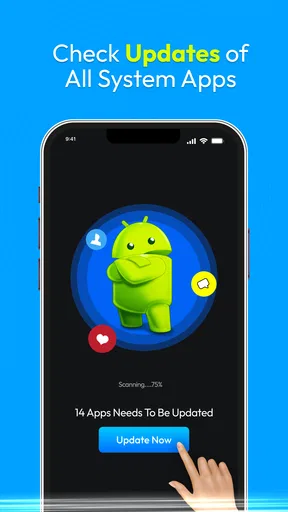
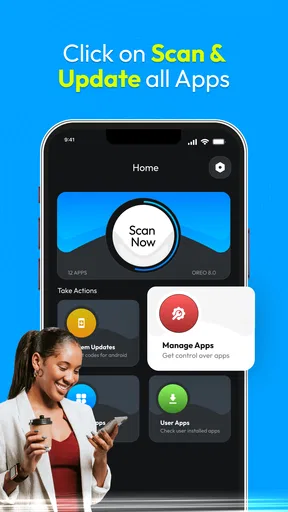
The setup process is pretty straightforward. Once you fire up the app, it quickly scans your device for installed apps and checks for available updates. This initial scan might take a few minutes, depending on how many apps you have, but it’s a one-time process. I was impressed by how thorough it was, catching updates that even my device’s default update manager missed.
Features That Stand Out
One of the standout features is the app’s ability to schedule updates. You can set it to update your apps overnight or during times when you’re least likely to use your phone. This is a game-changer for anyone who hates their phone slowing down while apps update in the middle of the day. Plus, it supports both Wi-Fi and data connections, giving you flexibility depending on your data plan.
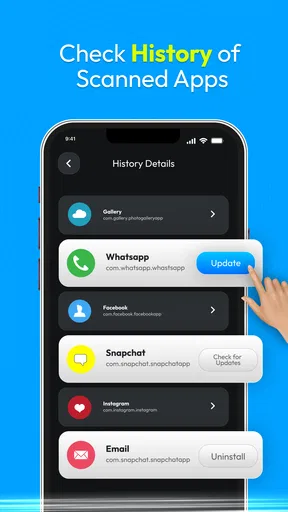
Another cool feature is the update history. The app keeps a log of all updates performed, which is handy if you ever need to troubleshoot an app after an update. You can easily roll back to a previous version if something goes awry, which is a lifesaver.
Performance and Reliability
In terms of performance, Software Update: App Updates is smooth as butter. It runs quietly in the background and doesn’t hog your phone’s resources. I didn’t notice any battery drain or lag, which is crucial for any background app. Reliability-wise, it’s been spot-on in notifying me of updates before they become an issue.
Even so, I wouldn’t rely on any update checker as the only signal that a phone is current. I’d occasionally open the phone’s usual app-update screen as a cross-check, especially before a trip or a busy week. If the two views do not appear to match, I’d use the official app store to confirm what is available and complete the installation there. That simple fallback keeps the process grounded in the standard source for app downloads.
For a heavy-use day, I would avoid scheduling a large round of changes just before leaving home. If an app is essential for navigation, tickets, or communication, test it before you need it and keep enough time to sign in again if the update changes its behavior. Updates are generally routine, but the inconvenience of being locked out at the wrong moment is real; timing is part of reliability, not an afterthought.
Is It Worth It?
If you're someone who loves to keep their apps in tip-top shape but hates the hassle of manual updates, then this app might just be your new best friend. It’s particularly useful for those of us who juggle multiple devices, ensuring each one is up to date without having to check each individually.
I’d especially consider it if you tend to postpone maintenance until several apps are waiting, or if you help someone who finds the usual update screens confusing. The best fit is someone who wants a reminder and a more organized point of attention, but is still comfortable making decisions about timing and data use. If you prefer complete manual control, use few apps, or expect updates to happen without any review, the phone’s built-in tools may be enough.
While the app offers a free version, there's also a premium option that removes ads and provides more advanced scheduling features. For most users, the free version will suffice, but if you want a more seamless experience, the premium might be worth considering.
Wrapping Up
In a world where app updates can sometimes feel like a chore, Software Update: App Updates makes the process painless and efficient. It’s a nifty tool that ensures your apps are always running the latest versions without you having to lift a finger. Whether you’re a casual smartphone user or a tech aficionado, this app is definitely worth checking out. So, why not give it a try and let it take some of the stress out of managing app updates?
My final take is more measured: I see it as a convenience layer for people who benefit from a nudge and a focused update routine, not as a performance booster or a replacement for Android’s own controls. Try it if organizing app maintenance is a recurring annoyance, then judge whether the extra step genuinely saves you effort. If it does, keep it in your routine; if your phone’s existing update process already feels effortless, there is little reason to add another tool.
Pros
- Easy-to-use interface for quick updates.
- Supports a wide range of apps and devices.
- Provides detailed update information.
- Automatic updates save time and effort.
- Minimal resource usage during updates.
Cons
- Occasional compatibility issues with older devices.
- Notifications can sometimes be intrusive.
- Limited customization options for updates.
- Requires a stable internet connection.
- Free version includes ads.
FAQs for Software Update: App Updates
What is Software Update: App Updates and how does it work?
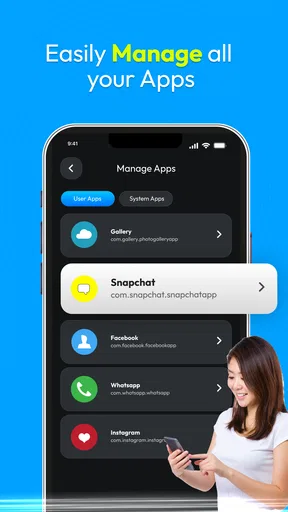
Software Update: App Updates is an application designed to automatically check and notify users about available updates for all installed apps on their device. It ensures that your apps are always running the latest version, offering better performance, new features, and enhanced security. The app scans your device periodically and provides a detailed list of apps with pending updates, enabling you to update them with ease.
Is Software Update: App Updates free to use?
Yes, Software Update: App Updates is free to download and use. The app offers its core functionality of checking for updates without any charges. However, it may include optional in-app purchases or ads to support its development and provide additional features. Users can choose to purchase premium features for an ad-free experience or enhanced capabilities.
How does Software Update: App Updates ensure the security of my device?
Software Update: App Updates enhances your device's security by keeping your apps updated to their latest versions, which often include security patches and bug fixes. The app itself is designed with user privacy in mind, ensuring that it does not collect unnecessary personal data or access sensitive information on your device. Always download the app from reputable sources like Google Play or the Apple App Store.
Will Software Update: App Updates slow down my device or consume a lot of battery?
Software Update: App Updates is optimized to run efficiently in the background without significantly affecting your device's performance or battery life. It periodically checks for updates and notifies you only when necessary, minimizing resource usage. Users can customize settings to control how frequently the app checks for updates, further managing battery consumption.
What should I do if Software Update: App Updates is not detecting updates for my apps?
If Software Update: App Updates is not detecting updates, first ensure your internet connection is stable. Check the app's settings to make sure update notifications are enabled. If the issue persists, try restarting your device or reinstalling the app. Additionally, verify that your device's operating system is compatible with the app's latest version for optimal functionality.


